Description
/* ===== Scoped Description Style ===== */.product-description.rte { font-family: -apple-system, BlinkMacSystemFont, “Segoe UI”, Roboto, “Helvetica Neue”, Arial, sans-serif; color: #2c2c2c; line-height: 1.65; font-size: 16px;}/* ===== Headings ===== */.product-description.rte h2 { font-size: 1.8em; color: #0D47A1; border-left: 4px solid #1f6fe5; padding-left: 12px; margin-top: 32px; margin-bottom: 16px;}/* ===== H3 Titles Optimization ===== */.product-description.rte h3 { font-size: 1.4em; color: #0D47A1; margin-top: 24px; margin-bottom: 12px; font-weight: 500; padding-bottom: 6px; border-bottom: 2px solid #e6e6e6;}/* ===== Paragraphs ===== */.product-description.rte p { margin-bottom: 20px; line-height: 1.8; color: #4a4f57; font-size: 16px;}/* ===== Paragraph Images (only in description) ===== */.product-description.rte img { display: block; max-width: 100%; height: auto; margin: 24px auto; border-radius: 12px; box-shadow: 0 8px 24px rgba(0, 0, 0, 0.06);}/* ===== Lists ===== */.product-description.rte ul { padding-left: 20px; margin-bottom: 16px; list-style-type: disc;}.product-description.rte li { margin-bottom: 6px;}/* ===== Links ===== */.product-description.rte a { color: #0288D1; text-decoration: none; transition: color 0.3s ease;}.product-description.rte a:hover { color: #01579B;}/* ===== M5Stack-style Spec Table ===== */.product-description.rte .table-container { width: 100%; margin: 24px 0; overflow-x: auto;}.product-description.rte .table-container table { width: 100%; border-collapse: collapse; font-family: inherit; font-size: 14px; color: #2c2f36; background-color: #ffffff; border-radius: 10px; overflow: hidden; box-shadow: 0 4px 12px rgba(0, 0, 0, 0.04);}.product-description.rte .table-container thead th { background: #1f6fe5; color: #ffffff; padding: 14px 16px; text-align: center; font-weight: 600; border: none; vertical-align: middle;}.product-description.rte .table-container td { padding: 14px 16px; border-bottom: 1px solid #e6ebf2; vertical-align: middle;}.product-description.rte .table-container tbody td:first-child { width: 36%; text-align: center; font-weight: 500; color: #4a4f57; background-color: rgba(31, 111, 229, 0.02);}.product-description.rte .table-container tbody tr:nth-child(even) { background-color: #f7f9fc;}@media (hover: hover) { .product-description.rte .table-container tbody tr:hover { background-color: #eef3ff; }}/* ===== Learn & Documents Button ===== */.product-description.rte #learn-and-documents-btn { display: inline-flex; align-items: center; padding: 6px 14px; background-color: #1f6fe5; color: #ffffff; font-weight: 600; border-radius: 6px; margin-top: 8px; text-decoration: none; transition: background 0.3s ease;}.product-description.rte #learn-and-documents-btn:hover { background-color: #1661c1;}/* ===== Responsive Design for Smaller Screens (with table adjustments) ===== */@media screen and (max-width: 768px) { .product-description.rte .table-container table, .product-description.rte .table-container thead, .product-description.rte .table-container tbody, .product-description.rte .table-container th, .product-description.rte .table-container td, .product-description.rte .table-container tr { display: block; width: 100%; } .product-description.rte .table-container thead { display: none; } .product-description.rte .table-container tbody tr { padding: 12px 0; border-bottom: 1px solid #e6ebf2; } .product-description.rte .table-container tbody td { padding: 8px 16px; border: none; text-align: left; } .product-description.rte .table-container tbody td:first-child { width: 100%; background: none; color: #1f6fe5; font-weight: 600; padding-top: 16px; } .product-description.rte .table-container tbody td:last-child { padding-bottom: 16px; color: #2c2f36; line-height: 1.6; } /* Ensure button appears correctly on mobile */ .product-description.rte #learn-and-documents-btn { font-size: 14px; padding: 8px 16px; }}
Description
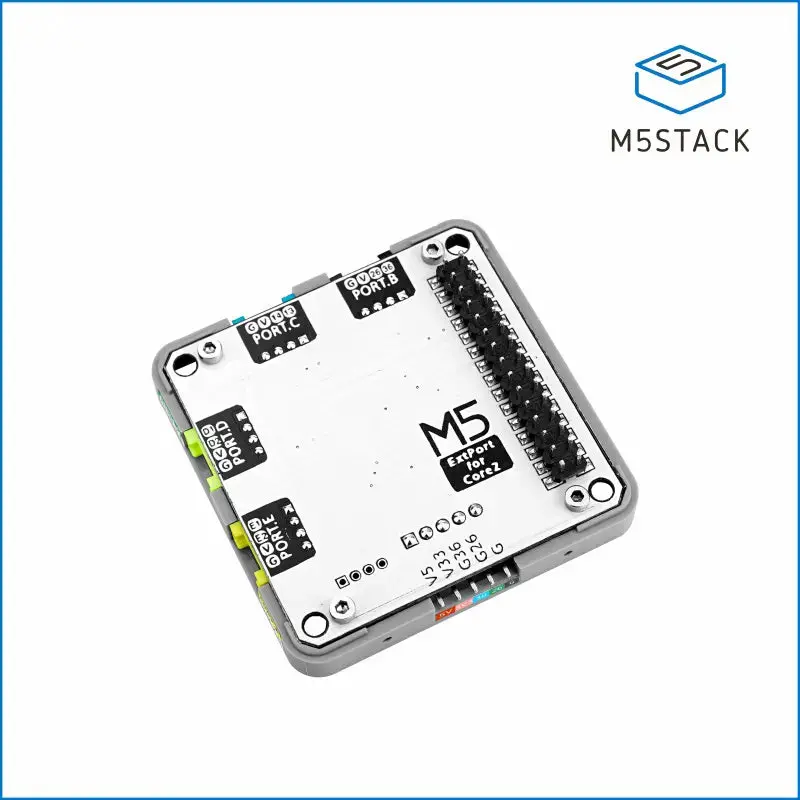
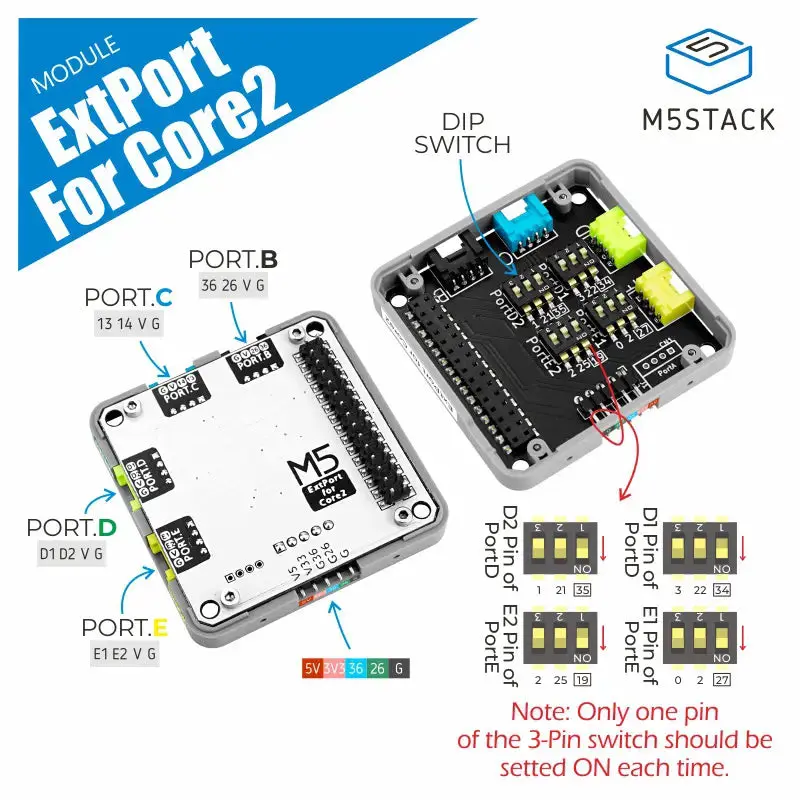
Module ExtPort For Core2 is a stacking expansion module specifically designed for the M5Stack Core2 to interface with Grove connectors. It provides PORT.B/PORT.C/PORT.D/PORT.E 4 Grove interfaces, where PORT.D/PORT.E can be configured with different GPIOs via internal DIP switches.
Note: 1. The front of ExtPort For Core2 features a collaborator’s signature.
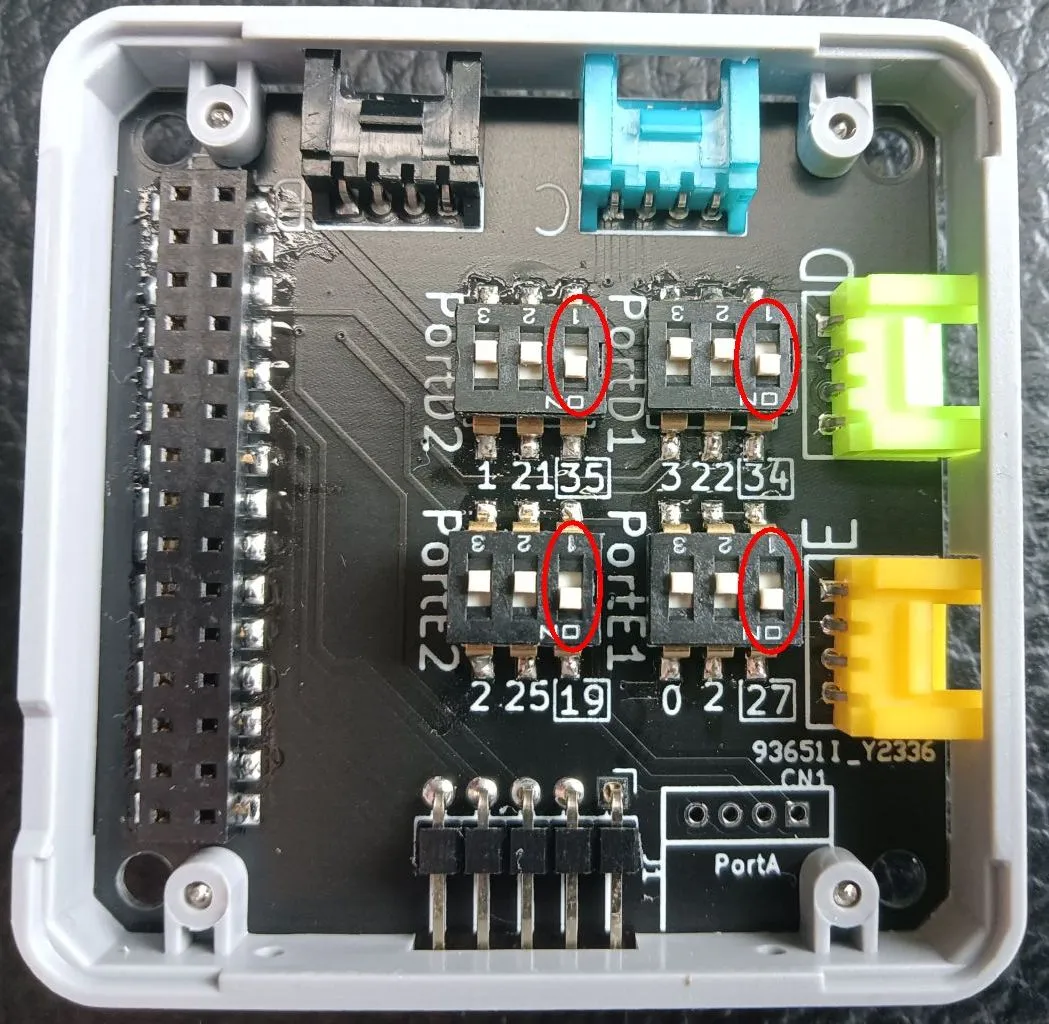
2. Before use, ensure that the corresponding DIP switches are set to ON. The “1” position of all DIP switches is set to ON by default. Remember that only one position in each DIP switch should be set to ON; if multiple positions are set to ON, the device may be damaged.
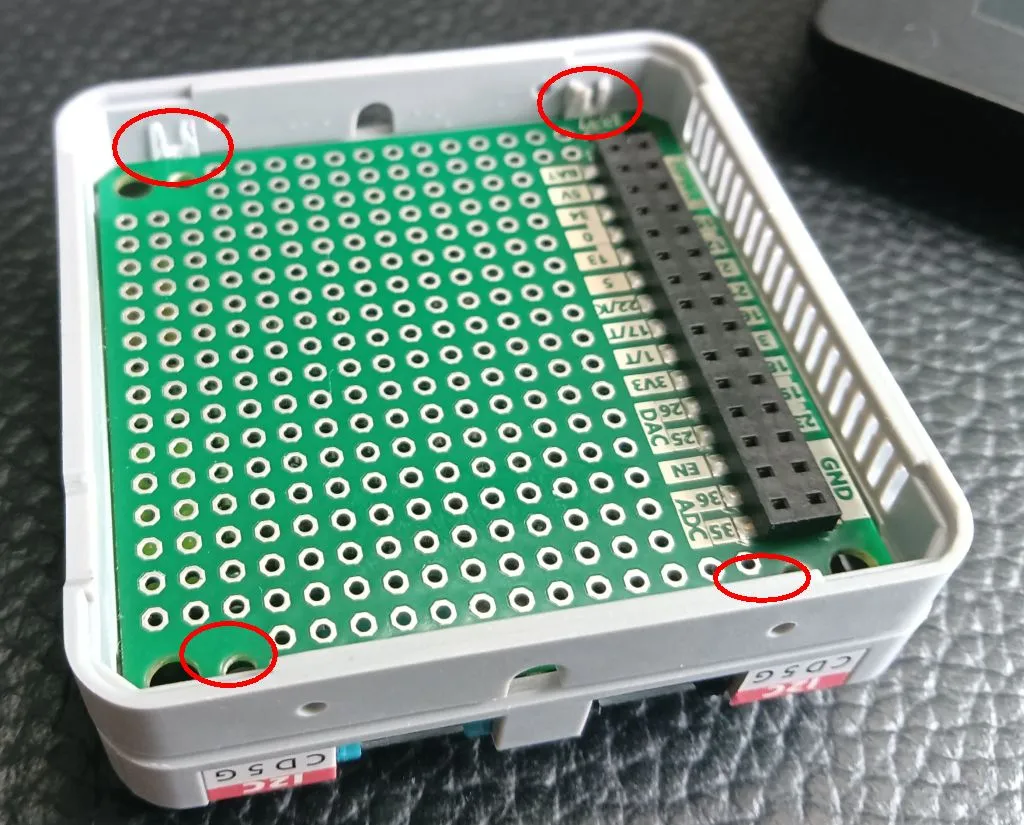
3. If you need to use the Core2’s bottom cover, you must cut off the four support legs of the PROTO module (as shown below) to avoid interference with the cover and prepare M3 screws of appropriate length for fixation.
Features
- 4 x Grove interfaces (PortB/C/D/E)
- 4 x 3-position DIP switches (PortD/E)
- 1 x 5Pin@2.54mm pin header
Includes
- 1 x Module ExtPort For Core2
Applications
- Multi-sensor, multi-actuator expansion
- DIY projects
Specifications
| Specification | Parameter |
|---|---|
| Expansion Port | PortB, PortC, PortD, PortE |
| Product Size | 54.0 x 54.0 x 13.0mm |
| Product Weight | 24.0g |
| Package Size | 132.0 x 95.0 x 16.0mm |
| Gross Weight | 58.0g |
Learn and Documents
→ DOCUMENTS
Explore more from our collection.
Reviews
There are no reviews yet.